> ## Documentation Index
> Fetch the complete documentation index at: https://cloud.laravel.com/docs/llms.txt
> Use this file to discover all available pages before exploring further.
# Serverless Postgres
> Fully managed, autoscaling Serverless Postgres database.
Powered by [Neon](https://neon.tech)
## Introduction
Laravel Serverless Postgres provides a fully managed, autoscaling Postgres database for your application. Serverless Postgres database clusters autoscale their compute resources and storage to automatically accommodate demand from your application.
Laravel Serverless Postgres supports a wide range of PostgreSQL extensions, including pgvector for AI and vector similarity search capabilities. To learn more about using pgvector for storing and searching vector embeddings, see [Neon's pgvector documentation](https://neon.com/docs/extensions/pgvector).
 ## Creating Serverless Postgres databases
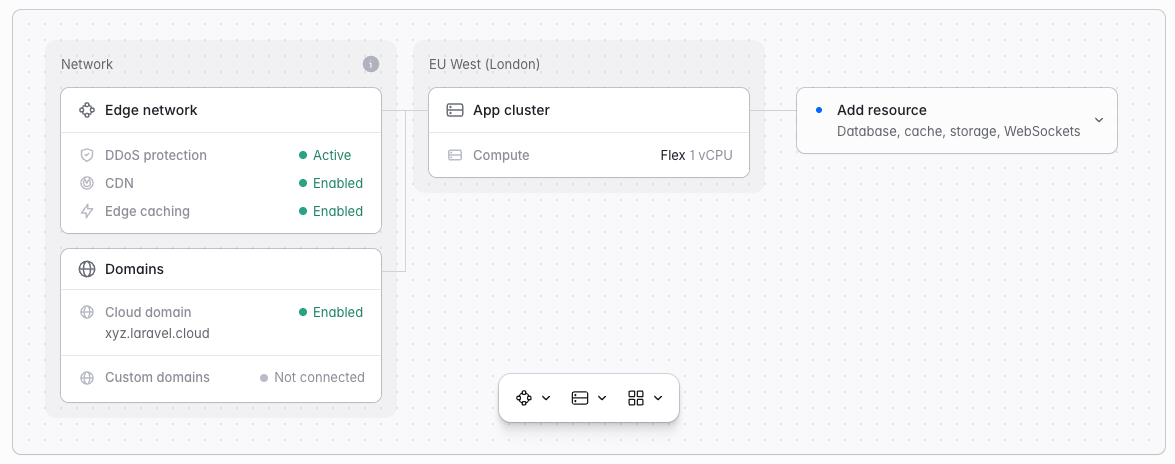
To create and attach a Serverless Postgres database to an environment:
1. Navigate to your environment's infrastructure canvas dashboard
2. Click "Add database"
3. Select an existing database cluster or create a new one:
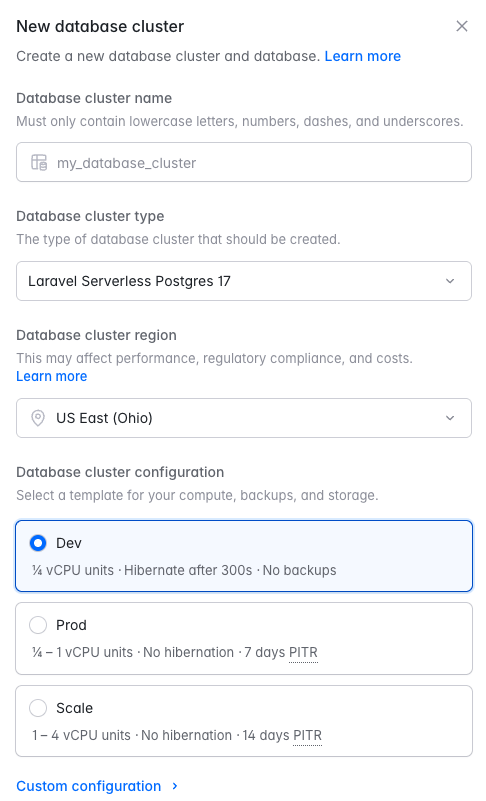
* **To create a new cluster**: Select the "Laravel Serverless Postgres" type at the Postgres version you want, then configure:
* **Cluster name**: A unique name for your database cluster
* **Region**: Must match your compute cluster's region
* **Configuration**: Choose a preset, or customize the [compute unit](#compute-units) range the cluster autoscales between, when it [scales to zero](#scale-to-zero), and how many days of point-in-time recovery backups to retain
4. Select an existing database within the cluster or create a new one:
* **Database name**: The name of the database within the cluster
The newest supported Postgres version is selected by default. Storage is not configured up front; it autoscales with the data your application stores.
You can also create Serverless Postgres databases from your organization's **Resources** page, but they will need to be attached to an environment separately.
## Creating Serverless Postgres databases
To create and attach a Serverless Postgres database to an environment:
1. Navigate to your environment's infrastructure canvas dashboard
2. Click "Add database"
3. Select an existing database cluster or create a new one:
* **To create a new cluster**: Select the "Laravel Serverless Postgres" type at the Postgres version you want, then configure:
* **Cluster name**: A unique name for your database cluster
* **Region**: Must match your compute cluster's region
* **Configuration**: Choose a preset, or customize the [compute unit](#compute-units) range the cluster autoscales between, when it [scales to zero](#scale-to-zero), and how many days of point-in-time recovery backups to retain
4. Select an existing database within the cluster or create a new one:
* **Database name**: The name of the database within the cluster
The newest supported Postgres version is selected by default. Storage is not configured up front; it autoscales with the data your application stores.
You can also create Serverless Postgres databases from your organization's **Resources** page, but they will need to be attached to an environment separately.
 Once created, you can attach the database to any environment in the same region. When attaching a database to an environment, you will need to re-deploy the environment for the changes to take effect.
Visit the [pricing](/docs/pricing#serverless-postgres) docs for information on compute and storage prices by region.
### Database clusters vs. databases
When creating a new database cluster, you will be asked to provide the desired name of the cluster and the desired name of the initial "database" that will be created within the cluster. Each database cluster may contain up to 500 databases. In web development, these databases are sometimes referred to as "schemas".
If your application requires more than 500 databases, you should create an additional database cluster and distribute your databases across clusters.
Environments attach to a database, not to a cluster. When attaching, you first choose the database cluster and then select the database within it that you want to make available through the `DB_DATABASE` environment variable.
### Editing and resizing database clusters
To edit your database clusters and adjust their compute / storage settings, navigate to **Organization > Resources > Databases** and click the **...** icon for the database cluster you would like to edit or resize. Then, click **Edit settings**.
Changing the compute unit range restarts your cluster's compute and briefly drops existing connections. Autoscaling within the configured range does not restart the compute.
### Monitoring database cluster metrics
To view your database cluster's metrics, navigate to **Organization > Resources > Databases**, click the database cluster card, and review the **Metrics** section. Use the time range selector to adjust the period shown.
### Deleting database clusters
To delete a database cluster, navigate to **Organization > Resources > Databases** and click the **...** icon for the database cluster you would like to delete. Then, click **Delete** and confirm your action.
## Compute units
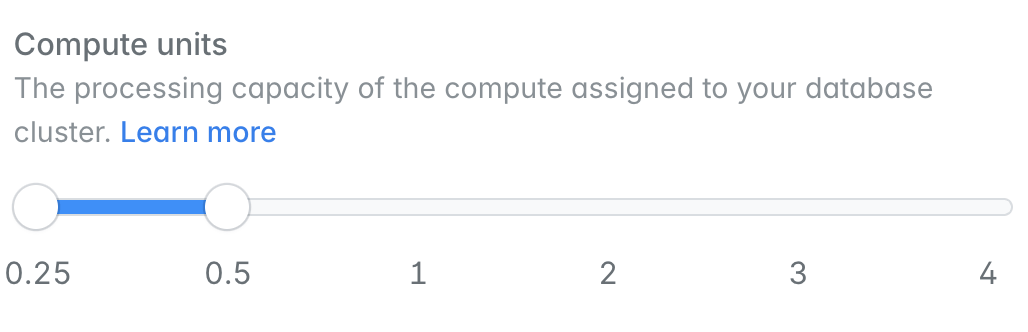
When creating a Laravel Serverless Postgres database cluster, you may configure the range of "compute units" your cluster should scale between based on demand. Compute units correspond to the following vCPU / RAM configurations:
| Compute Units | vCPUs | RAM |
| - | - | - |
| .25 | .25 | 1 GB |
| .5 | .5 | 2 GB |
| 1 | 1 | 4 GB |
| 2 | 2 | 8 GB |
| 4 | 4 | 16 GB |
| 8 | 8 | 32 GB |
| 10 | 10 | 40 GB |
The maximum compute units available to your cluster depend on your [plan](/docs/pricing#serverless-postgres). On the Growth plan, clusters may scale up to 4 CU by default. If you need more compute units, [contact support](/docs/support) to [request a higher limit](/docs/pricing#raising-plan-limits).
## Connection pooler
Laravel Serverless Postgres offers connection pooling via [pgbouncer](https://www.pgbouncer.org/), enabling up to 10,000 concurrent connections to your cluster.
To connect to the pgbouncer endpoint of your database cluster, append `-pooler` to the first segment of the cluster's host name. For example, if your database cluster's host name is `ep-frosty-shadow-a57j6ubb.us-east-2.pg.laravel.cloud`, the corresponding pgbouncer endpoint is `ep-frosty-shadow-a57j6ubb-pooler.us-east-2.pg.laravel.cloud`.
Then, add the new host name as the `DB_HOST` environment variable in your environment's General Settings:
```ini theme={null}
DB_HOST="frosty-shadow-a57j6ubb-pooler.us-east-2.pg.laravel.cloud"
```
## Scale-to-Zero
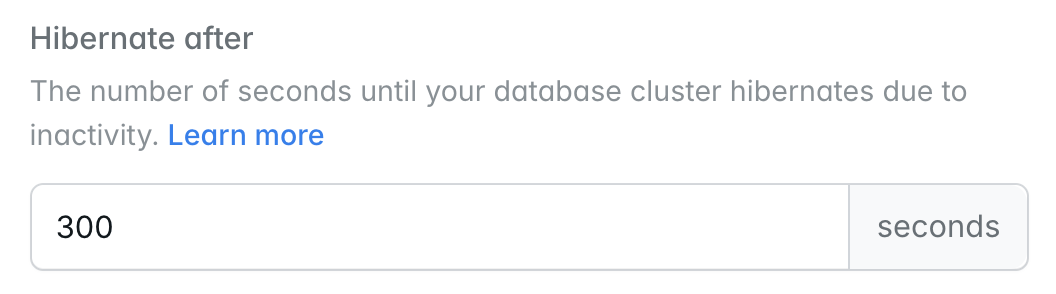
Laravel Serverless Postgres database clusters may be configured to automatically scale to zero after not receiving any incoming queries for a given number of seconds. When a Serverless Postgres cluster is sleeping, you will not be billed for its compute resources.
If the cluster receives an incoming query while it is sleeping, it will automatically wake up within a few hundred milliseconds.
Once created, you can attach the database to any environment in the same region. When attaching a database to an environment, you will need to re-deploy the environment for the changes to take effect.
Visit the [pricing](/docs/pricing#serverless-postgres) docs for information on compute and storage prices by region.
### Database clusters vs. databases
When creating a new database cluster, you will be asked to provide the desired name of the cluster and the desired name of the initial "database" that will be created within the cluster. Each database cluster may contain up to 500 databases. In web development, these databases are sometimes referred to as "schemas".
If your application requires more than 500 databases, you should create an additional database cluster and distribute your databases across clusters.
Environments attach to a database, not to a cluster. When attaching, you first choose the database cluster and then select the database within it that you want to make available through the `DB_DATABASE` environment variable.
### Editing and resizing database clusters
To edit your database clusters and adjust their compute / storage settings, navigate to **Organization > Resources > Databases** and click the **...** icon for the database cluster you would like to edit or resize. Then, click **Edit settings**.
Changing the compute unit range restarts your cluster's compute and briefly drops existing connections. Autoscaling within the configured range does not restart the compute.
### Monitoring database cluster metrics
To view your database cluster's metrics, navigate to **Organization > Resources > Databases**, click the database cluster card, and review the **Metrics** section. Use the time range selector to adjust the period shown.
### Deleting database clusters
To delete a database cluster, navigate to **Organization > Resources > Databases** and click the **...** icon for the database cluster you would like to delete. Then, click **Delete** and confirm your action.
## Compute units
When creating a Laravel Serverless Postgres database cluster, you may configure the range of "compute units" your cluster should scale between based on demand. Compute units correspond to the following vCPU / RAM configurations:
| Compute Units | vCPUs | RAM |
| - | - | - |
| .25 | .25 | 1 GB |
| .5 | .5 | 2 GB |
| 1 | 1 | 4 GB |
| 2 | 2 | 8 GB |
| 4 | 4 | 16 GB |
| 8 | 8 | 32 GB |
| 10 | 10 | 40 GB |
The maximum compute units available to your cluster depend on your [plan](/docs/pricing#serverless-postgres). On the Growth plan, clusters may scale up to 4 CU by default. If you need more compute units, [contact support](/docs/support) to [request a higher limit](/docs/pricing#raising-plan-limits).
## Connection pooler
Laravel Serverless Postgres offers connection pooling via [pgbouncer](https://www.pgbouncer.org/), enabling up to 10,000 concurrent connections to your cluster.
To connect to the pgbouncer endpoint of your database cluster, append `-pooler` to the first segment of the cluster's host name. For example, if your database cluster's host name is `ep-frosty-shadow-a57j6ubb.us-east-2.pg.laravel.cloud`, the corresponding pgbouncer endpoint is `ep-frosty-shadow-a57j6ubb-pooler.us-east-2.pg.laravel.cloud`.
Then, add the new host name as the `DB_HOST` environment variable in your environment's General Settings:
```ini theme={null}
DB_HOST="frosty-shadow-a57j6ubb-pooler.us-east-2.pg.laravel.cloud"
```
## Scale-to-Zero
Laravel Serverless Postgres database clusters may be configured to automatically scale to zero after not receiving any incoming queries for a given number of seconds. When a Serverless Postgres cluster is sleeping, you will not be billed for its compute resources.
If the cluster receives an incoming query while it is sleeping, it will automatically wake up within a few hundred milliseconds.
 ## Autoscaling compute
Serverless compute can autoscale up and down based on your database cluster's utilization. Set a minimum and maximum range and only pay for the compute resources you actually need.
## Autoscaling compute
Serverless compute can autoscale up and down based on your database cluster's utilization. Set a minimum and maximum range and only pay for the compute resources you actually need.
 ## Connecting to database clusters
### From your application
When a database is attached to an environment, Laravel Cloud automatically injects database connection environment variables, including `DB_HOST`, `DB_USERNAME`, `DB_PASSWORD`, and `DB_DATABASE`. You may view these variables in your environment's General Settings.
### From your local machine
To connect to your database from your local machine using a database management client like [TablePlus](https://tableplus.com/), navigate to **Organization > Resources > Databases**, click your database cluster, and click **View credentials** at the top of the page. To view credentials for a specific database, use its **... > View credentials** menu in the **Databases** section.
## Connecting to database clusters
### From your application
When a database is attached to an environment, Laravel Cloud automatically injects database connection environment variables, including `DB_HOST`, `DB_USERNAME`, `DB_PASSWORD`, and `DB_DATABASE`. You may view these variables in your environment's General Settings.
### From your local machine
To connect to your database from your local machine using a database management client like [TablePlus](https://tableplus.com/), navigate to **Organization > Resources > Databases**, click your database cluster, and click **View credentials** at the top of the page. To view credentials for a specific database, use its **... > View credentials** menu in the **Databases** section.
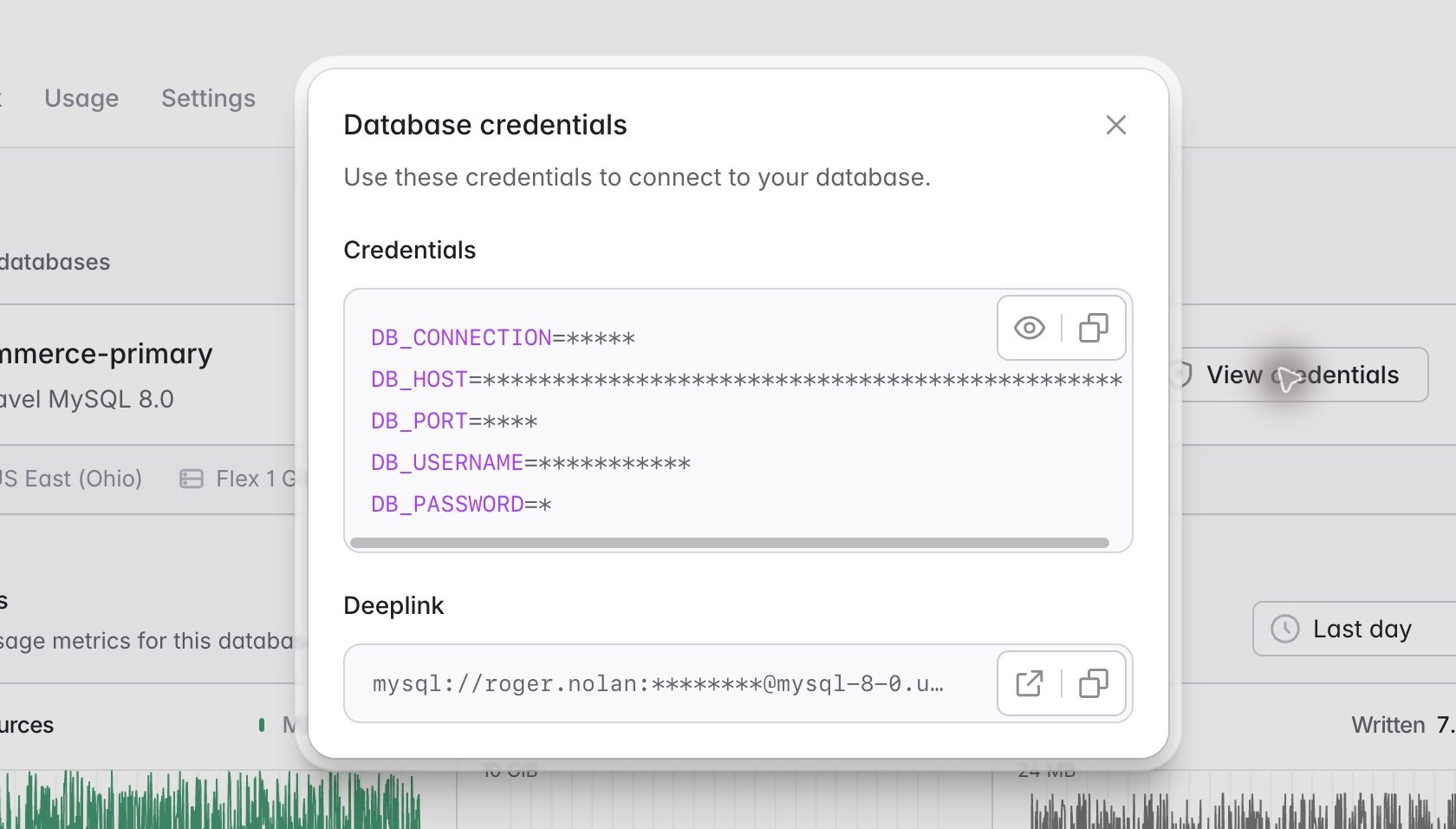 The credentials dialog provides the connection details for your database. Use the **Open in database client** button in the **Deeplink** field to open your database in your local machine's default database management client, if you have one installed.
### Postgres SSL connections
Neon, which powers Laravel Serverless Postgres, uses the [public ISRG Root X1 certificate](https://neon.tech/docs/connect/connect-securely#location-of-system-root-certificates) issued by Let's Encrypt. Due to this, you can create an SSL Connection with your Postgres cluster by using the [appropriate CA certificate](https://neon.tech/docs/connect/connect-securely#location-of-system-root-certificates:~:text=etc/security/cacerts-,macOS,-%3A) for your operating system. If you are using macOS, this certificate should already be located within your `/etc/ssl/cert.pem` path.
## Troubleshooting
### Too many connections
```text theme={null}
SQLSTATE[08006] [7] ... FATAL: sorry, too many clients already
```
Postgres rejects new connections once your cluster reaches its connection limit. This usually happens when many app instances, queue workers, or background processes each hold their own connections at the same time.
To resolve this error, connect through the [connection pooler](#connection-pooler), which supports up to 10,000 concurrent connections. You may also reduce the number of replicas or worker processes connecting to the database. If the error persists, [contact support](/docs/support).
### High CPU usage
If your cluster's **Metrics** show sustained high CPU usage, or your cluster regularly runs at its maximum compute units, [raise the maximum](#editing-and-resizing-database-clusters) of its compute unit range. Slow or unindexed queries are also a common cause. [Laravel Nightwatch](https://nightwatch.laravel.com) can show you which queries are slowest and where in your application they run.
The credentials dialog provides the connection details for your database. Use the **Open in database client** button in the **Deeplink** field to open your database in your local machine's default database management client, if you have one installed.
### Postgres SSL connections
Neon, which powers Laravel Serverless Postgres, uses the [public ISRG Root X1 certificate](https://neon.tech/docs/connect/connect-securely#location-of-system-root-certificates) issued by Let's Encrypt. Due to this, you can create an SSL Connection with your Postgres cluster by using the [appropriate CA certificate](https://neon.tech/docs/connect/connect-securely#location-of-system-root-certificates:~:text=etc/security/cacerts-,macOS,-%3A) for your operating system. If you are using macOS, this certificate should already be located within your `/etc/ssl/cert.pem` path.
## Troubleshooting
### Too many connections
```text theme={null}
SQLSTATE[08006] [7] ... FATAL: sorry, too many clients already
```
Postgres rejects new connections once your cluster reaches its connection limit. This usually happens when many app instances, queue workers, or background processes each hold their own connections at the same time.
To resolve this error, connect through the [connection pooler](#connection-pooler), which supports up to 10,000 concurrent connections. You may also reduce the number of replicas or worker processes connecting to the database. If the error persists, [contact support](/docs/support).
### High CPU usage
If your cluster's **Metrics** show sustained high CPU usage, or your cluster regularly runs at its maximum compute units, [raise the maximum](#editing-and-resizing-database-clusters) of its compute unit range. Slow or unindexed queries are also a common cause. [Laravel Nightwatch](https://nightwatch.laravel.com) can show you which queries are slowest and where in your application they run.