

Introduction
Background jobs allow your application to defer slow or expensive work, such as sending email, generating PDFs, calling external APIs, or processing media, so that it can respond to web requests quickly. Managed queues are available for Laravel and Symfony applications. To run custom background processes on any supported runtime, see Workers. Managed queues isolate background jobs from your web traffic and run them on dedicated workers that scale with the work waiting to be processed. Flex workers scale to zero when idle, so you pay for compute only while jobs run. The Queues dashboard provides metrics, failed-job visibility, and retry controls.Managed queues vs. workers
Managed queues are the preferred choice for all new and existing Laravel and Symfony applications. Laravel Cloud provisions and operates the queue infrastructure, so you do not need to manage queue workers or drivers yourself. Use Workers when your application needs a custom long-running process or must continue using a self-managed queue driver, such as Redis or a database queue. Workers are available for every supported runtime, but you configure the command, process count, autoscaling, and operational behavior yourself.Managed queues
Each managed queue has its own worker pool, memory allocation, and autoscaling range, and is provisioned in its environment’s region.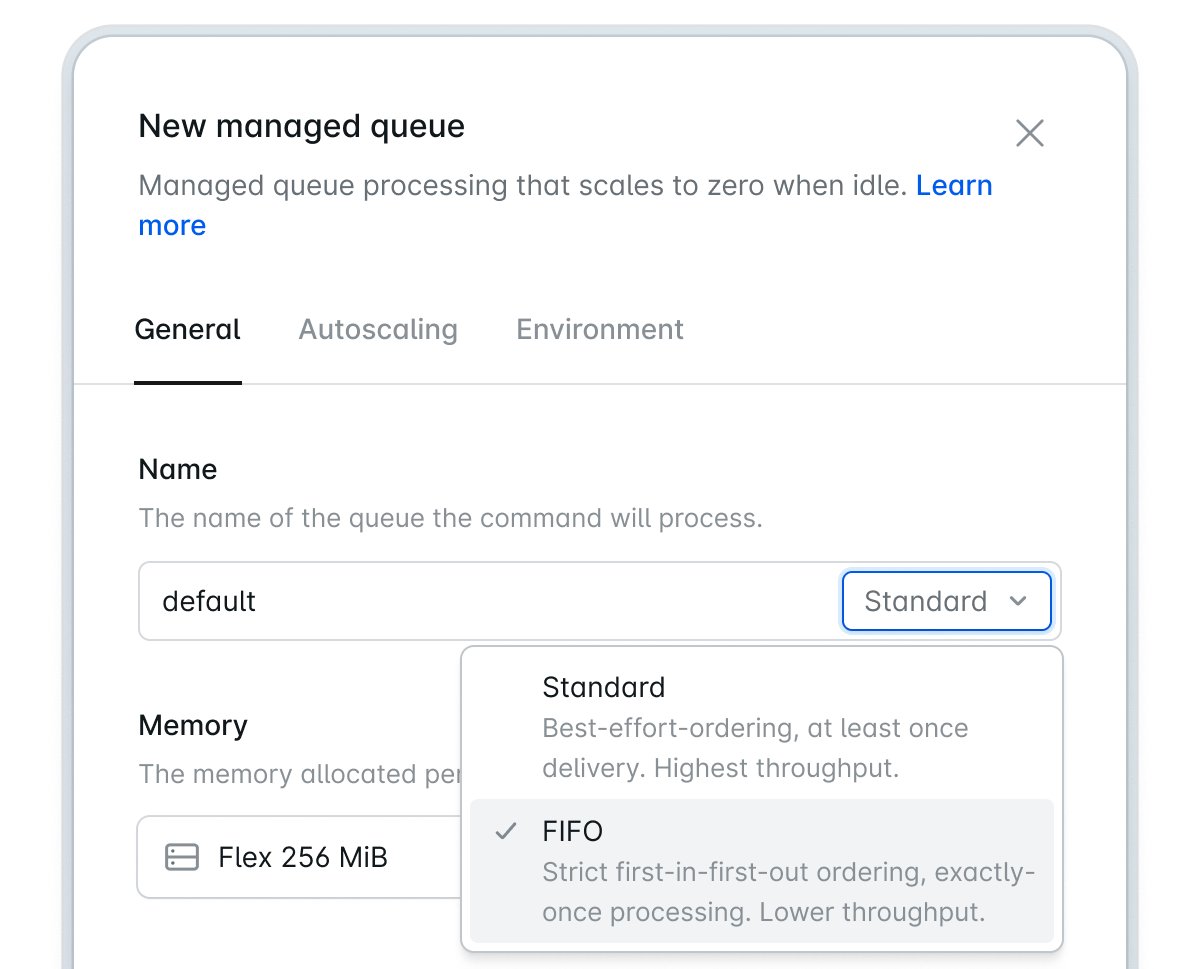
Business and Enterprise organizations that need more queues per environment may contact support to raise this limit.
If you are on the Growth plan and need more queues per environment, contact support to request a higher limit.
Configure managed queues
Creating a managed queue
Open your environment, click Add compute on the canvas toolbar, then Managed queue. Provide a queue name, choose its queue type, memory allocation, and worker autoscaling range, then deploy the environment. Once deployed, Laravel Cloud creates the queue, configures access from your application, and starts its worker pool. Queue names may contain letters, numbers, hyphens, and underscores, and must be 39 characters or fewer, including the.fifo suffix for FIFO queues.
Each managed queue handles one queue name. The first queue you create becomes the environment’s default queue. You can select Set as default from a queue’s canvas menu to change it.
Queue types
Each managed queue is either a standard queue or a FIFO queue. You choose the type when creating the queue and cannot change it afterward. Standard queues provide at-least-once delivery with best-effort ordering and support per-job delays of up to 15 minutes. They are the right choice for most workloads. FIFO queues deliver jobs in dispatch order and deduplicate jobs on arrival. They suit order-sensitive workloads such as payment processing and ledger updates. FIFO queues do not support per-job delays and have a small operations premium. Laravel Cloud appends.fifo to every FIFO queue name. For example, a queue named orders becomes orders.fifo. A standard orders queue and a FIFO orders.fifo queue may exist in the same environment.
Compute classes
Every managed queue runs on either the Flex or Pro compute class:
Pro sizes are priced at a 20% premium over the equivalent Flex size. Flex is the default and works well for spiky or idle-heavy workloads. Pro is appropriate for steady throughput and for jobs that exceed Flex’s runtime or memory limits. Pro is available on the Growth, Business, and Enterprise plans. Enterprise customers on Private Cloud can use dedicated Pro sizes up to 16 GiB.
Memory allocation
Each managed queue worker runs on an instance with configurable memory, and CPU scales proportionally with the selected size. The default, 256 MiB, is sufficient for typical jobs such as sending email, processing webhooks, updating records, and light data transformation.
If a job exceeds its worker’s memory allocation, the worker restarts and Laravel Cloud redelivers the job. The failure usually appears as a PHP fatal error reporting that the allowed memory size was exhausted. Check the Memory chart on the Queues dashboard when workers repeatedly restart.
See the queue worker memory sizing guide for guidance on selecting a size.
Managed queue sizes are independent of App and worker cluster sizes. For queues created before Flex and Pro, see Upgrading from earlier managed queues.
Worker autoscaling
Each queue scales between a configured minimum and maximum number of workers. The lowest allowed minimum depends on the queue’s compute class. Choose a maximum that your database, APIs, and other downstream systems can handle in parallel.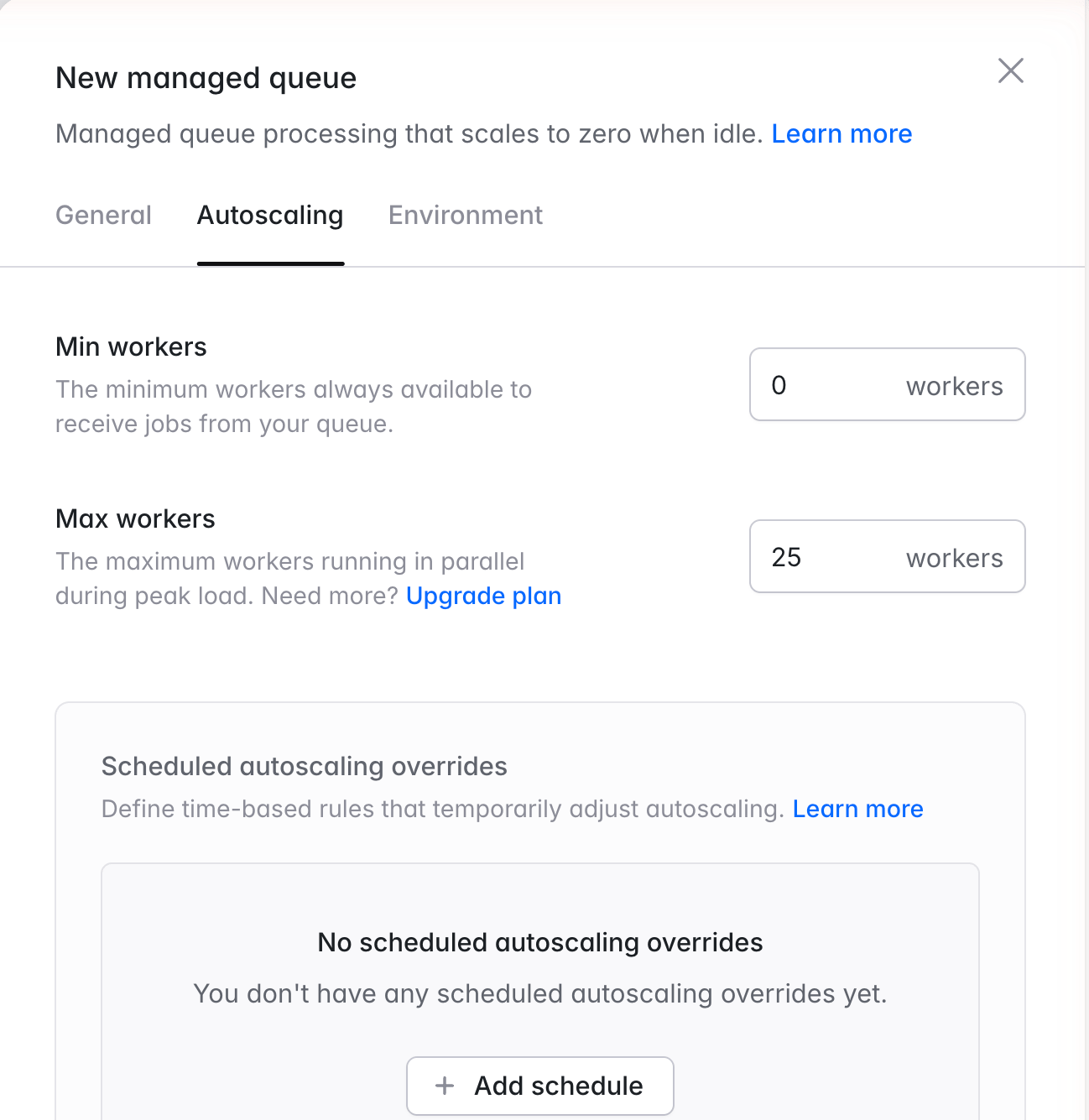
Business and Enterprise organizations that need more workers per queue may contact support to raise this limit.
If you are on the Growth plan and need more workers per queue or larger worker memory sizes, contact support to request higher limits.
Laravel Cloud measures queue depth and job duration to add and remove workers, removing them gradually as the queue drains.
Scheduled autoscaling. Managed queues also support scheduled autoscaling, which temporarily changes the minimum and maximum worker count on a one-time or recurring schedule. Scheduled overrides follow the same rules as scheduled autoscaling for compute clusters.
Advanced settings. Organizations with the advanced managed queues entitlement can override visibility and graceful shutdown timeouts from a queue’s Advanced tab. Flex queues cannot extend the graceful shutdown timeout beyond 90 seconds. Most applications should use Laravel Cloud’s defaults.
Connect your application
- Laravel
- Symfony
Requirements
Managed queues require Laravel 11.55.0, 12.63.0, 13.19.0, or newer and theaws/aws-sdk-php package in your composer.json:Queue connection
When you deploy a managed queue, Laravel Cloud setsQUEUE_CONNECTION=cloud for the environment. Jobs dispatched without an explicit connection use the managed queue.To continue using another driver for some jobs, set QUEUE_CONNECTION to that driver and dispatch managed-queue jobs explicitly with ->onConnection('cloud'). Laravel applications that use the default database driver are the most likely to be affected.Setting a default queue
The default managed queue receives jobs dispatched without an explicit queue name. For example,dispatch(new SendEmail) uses the default queue rather than a queue literally named default. You may rename the default queue without changing these dispatch calls.Operate managed queues
How jobs are processed
Laravel Cloud long-polls each queue and delivers jobs directly to workers. Jobs are usually picked up within milliseconds when workers are running and within a second when a Flex queue wakes from zero. There is no polling interval to configure. Laravel Cloud extends a job’s visibility timeout in three-minute increments while it runs. If a worker crashes or stops before the job completes, the job is retried. Design jobs to tolerate at-least-once delivery. When a worker must stop, Flex workers have 90 seconds and Pro workers have one hour to finish their current job. Run jobs that may exceed 90 seconds on Pro.Filesystem
Each managed queue worker has its own ephemeral filesystem. Every 1 GiB of worker memory provides 512 MiB of temporary disk space. Files are not shared between jobs and are reset whenever a worker is replaced. Use Laravel Object Storage for persistent files.Observability
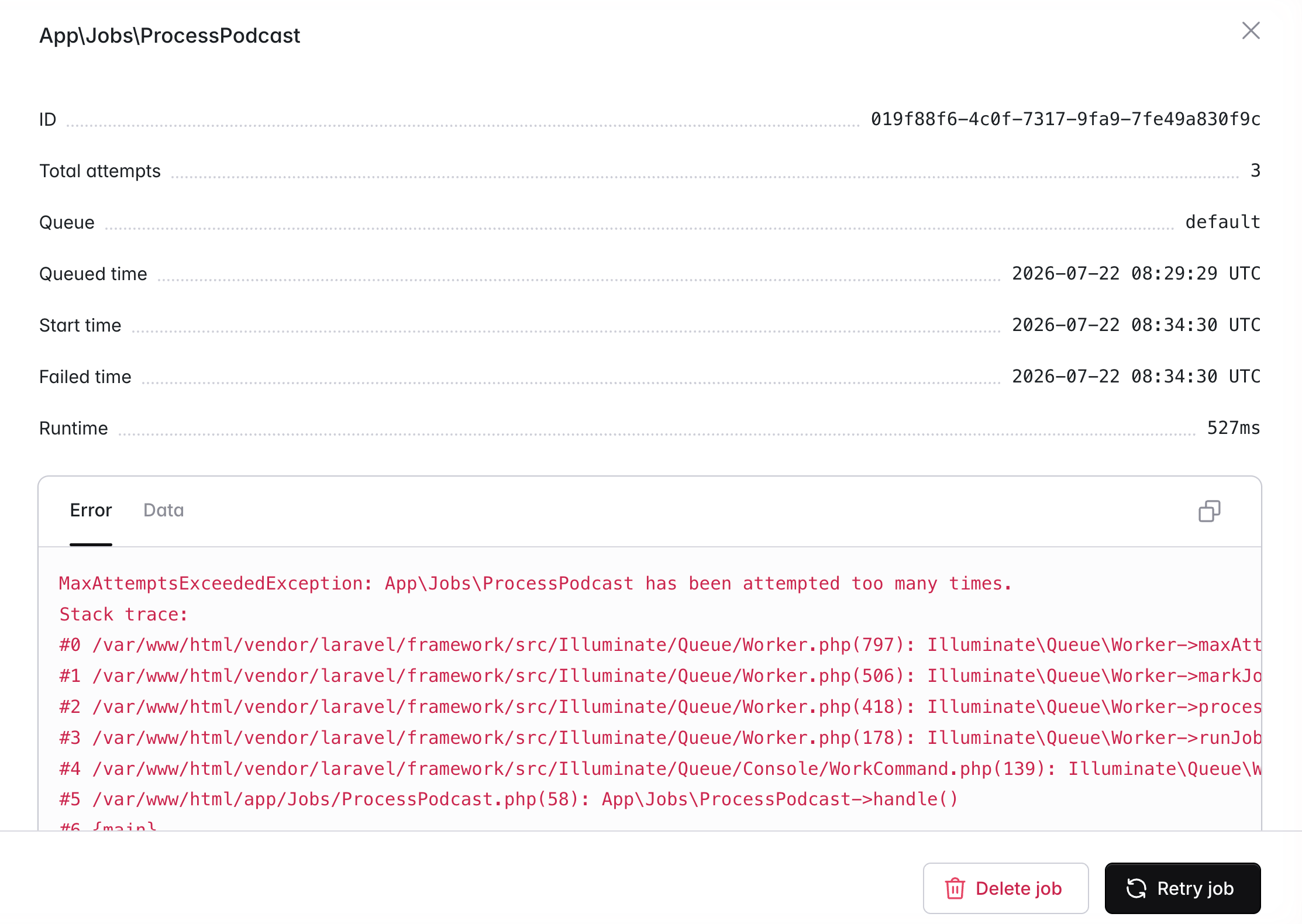
The Queues dashboard, under an environment’s Monitoring tab, shows job volume, processing duration, memory usage, active workers, and failed jobs for every managed queue. Failed jobs can be inspected, retried, or deleted from the dashboard or the Laravel Cloud API. Retries and deletions require edit access to the environment.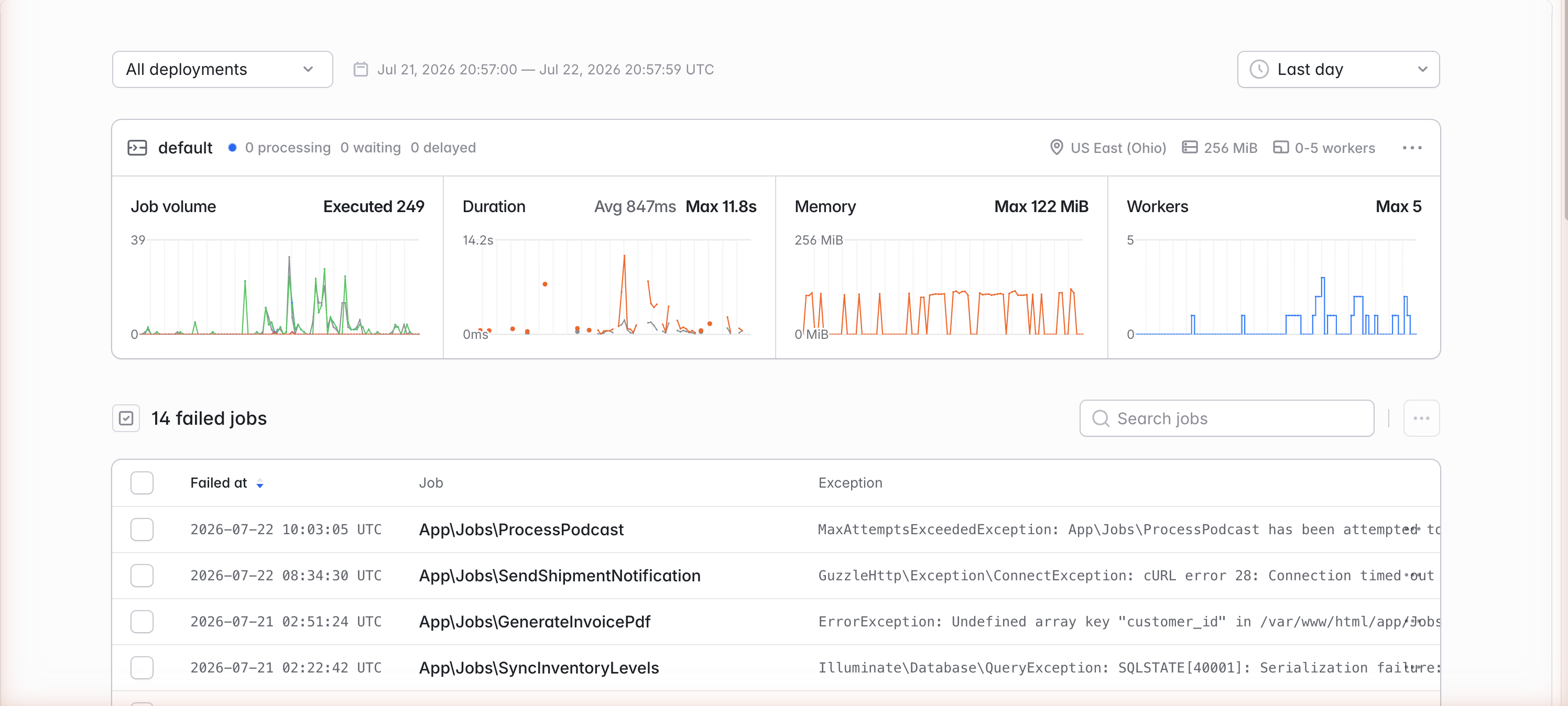
Pausing and purging
Pause a queue from its canvas menu to stop processing while allowing in-flight jobs to finish. Laravel Cloud stops polling and scales workers to zero, so no worker or polling charges accrue while it is paused. New jobs remain in the queue until you resume it. Thequeue:pause Artisan command is not supported. Pause and purge actions require edit access to the environment.
Purging removes every waiting job and cannot be undone. It may take up to 60 seconds and does not affect jobs already being processed.
Preview environments
Managed queues work in preview environments. Each preview receives isolated queues and workers, billed like other preview resources.Pricing
Managed queues are billed for worker time and queue operations. Flex workers are billed only while running, while Pro workers are billed continuously. For example, a Flex queue that runs three workers for 20 minutes is billed for 3,600 worker-seconds. Standard queue operations cost $1 per 1 million operations and FIFO operations cost $1.10 per 1 million operations. Dispatching, starting, and deleting a successful job each count as an operation. Long-running jobs record additional visibility-extension operations while they run. Payload-bearing dispatches and starts are measured in 64 KB chunks, and a job payload may be up to 1 MiB. Laravel Cloud’s polling baseline is approximately $0.13 per queue each month. See Managed queues pricing for current regional pricing and plan limits.Migration and compatibility
Limitations
See Queue types for the delivery, ordering, and delay guarantees of standard and FIFO queues. Laravel Horizon and thequeue:failed, queue:retry, and queue:clear Artisan commands do not support managed queues. Use the Queues dashboard or Laravel Cloud API to manage failed jobs.
Upgrading from earlier managed queues
The latest managed queue generation automatically manages polling, visibility, and shutdown timeouts. To upgrade an earlier queue, update Laravel to a supported version and commit the updatedcomposer.lock, select a Flex or Pro size in the queue settings, and deploy. Your queue keeps its earlier runtime and settings until you select a new size.
After upgrading, its previous polling interval setting no longer appears, and its visibility and shutdown timeouts return to the defaults unless your organization has the advanced managed queues entitlement. Failed jobs carry over, but the queue cannot return to its earlier runtime.
Queues that have not been upgraded retain their current settings and pricing until the earlier generation is retired on September 30, 2026. Those queues stop processing after that date. Because the underlying SQS queue retains a message for at most 14 days, jobs that remain unprocessed for longer than 14 days are lost.